Margin for macOS
Download the free beta.
Install it, connect Notion, and your notes start arriving. It updates itself from here on.
Download for Macv0.1.0-beta.8, 114.2 MB, Aug 2, 2026
macOS 11 or later, Apple silicon
01
Open the DMG and drag Margin to Applications
It's signed and notarized by Apple, so it opens without a Gatekeeper warning.
02
Grant access to Apple Notes
macOS asks once, and words it alarmingly. That wording is Apple's, and it is identical for every app that automates another. It is the only permission Margin needs to sync, and the connection is read-only.
03
Connect Notion and pick one parent page
Notion's own screen asks which pages Margin may touch. It needs exactly one, so pick or create a single empty page and your folders are built underneath it. Everything else in your workspace stays invisible to Margin.
Want to know exactly what leaves your Mac first? Read the full breakdown.
On first run
macOS will ask for one permission.
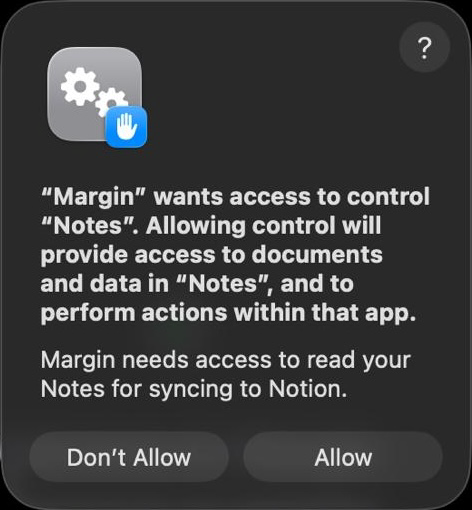
You will see this once, on first run
Automation for Notes, the one Margin needs
This is the permission that matters, and the only one Margin needs in order to sync. It is macOS's way of asking whether one app may talk to another. Margin uses it to ask the Notes app to hand over your notes, the same route the Notes app's own export uses. It never reads the contents of Apple's notes database.
Why the wording is so alarming
macOS words this dialog alarmingly. It warns about "documents and data" and the ability to "perform actions". That text is written by Apple and is identical for every app that automates another, whether it reads one note or rewrites your whole library. It is not describing what Margin does.
Full Disk Access, offered but optional
Only so Margin notices a new or renamed folder straight away, by watching when the Notes database file last changed. It never opens that file or reads anything out of it, and syncing works the same without it. Skip it if you would rather.
Never requested
You can withdraw it at any time in System Settings, under Privacy & Security, then Automation. Margin stops being able to read anything the moment you do.